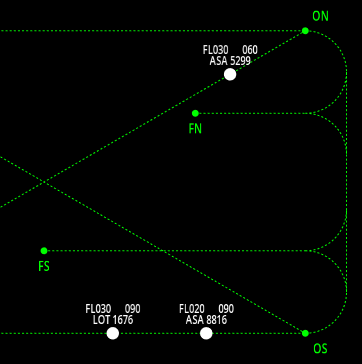
Preview: Watch FEAST 2: Multi Pass Overview in Action
Objective
Guide aircraft safely through waypoints by correctly classifying flight strips into appropriate waypoint boxes, respond to audio callsign challenges, and prevent collisions.
How It Works
This game combines visual air traffic management with audio recognition challenges. Flight strips appear in the 'New Flights' area before the aircraft spawns on the radar. You must drag each strip to the correct waypoint box matching the aircraft's next waypoint before the timer expires. Each time the aircraft passes a waypoint, a new classification timer starts for the next waypoint, requiring you to move the strip again. You can also change an aircraft's route by clicking waypoints in the strip and selecting an alternative path, and change flight levels by clicking the flight level label. When audio is enabled, you must additionally respond to callsign challenges. After an aircraft passes its final waypoint, click 'Hand Over' on the strip. The game tests your ability to manage multiple information streams and make quick decisions under time pressure.
Step-by-step Instructions
- Monitor aircraft moving through the airspace between waypoints
- When a new aircraft is about to enter the airspace, its flight strip appears in the 'New Flights' area before the aircraft spawns on the radar
- Drag the flight strip to the correct waypoint box (matching the aircraft's next waypoint) before the timer expires
- Each time the aircraft passes a waypoint, a new classification timer starts — move the strip to the next waypoint box
- Each waypoint box corresponds to a specific waypoint (EN, OS, FN, FS, ES, ON)
- Click on waypoints in a strip to change the aircraft's route by selecting from available alternative routes
- Change an aircraft's flight level by clicking the flight level label on the strip
- If audio is enabled, listen for callsigns and press CONFIRM when you hear the example callsign
- Prevent aircraft collisions by monitoring their paths
- Click 'Hand Over' on flight strips when aircraft have passed their final waypoint
Skills You Develop
- Multi-tasking and divided attention
- Visual-spatial organization and strip management
- Audio recognition and response
- Quick decision making under time pressure
- Waypoint navigation understanding
- Collision detection and prevention
- Working memory for tracking multiple aircraft simultaneously
Coaching Tips
- Learn the waypoint layout and which boxes correspond to which waypoints
- Classify strips as soon as they appear — the timer starts before the aircraft even spawns
- After each waypoint is passed, move the strip to the next waypoint box promptly
- Click waypoints in the strip to explore alternative routes when needed
- When audio is enabled, focus on the example callsign shown in the label
- Press CONFIRM only when you hear the example callsign in the audio sequence
- Prioritize strip classification before the timer expires
- Monitor aircraft paths to anticipate potential collisions
- Use the waypoint sequence and estimated times on each strip to plan ahead
- Remember that aircraft must pass their final waypoint before handover
Explore Other Training Modules
Discover more modules to enhance your preparation for FEAST

FEAST 1: Detect Conflicts Overview
A cognitive training game where you identify potential collisions between aircraft by detecting directional conflicts....
Learn More
FEAST 1: Divided Attention Overview
A cognitive training game that tests your ability to monitor multiple areas simultaneously and respond quickly to events...
Learn More
FEAST 1: Distinguish Left and Right Overview
A spatial reasoning game that tests your ability to identify the location of objects relative to a human figure shown fr...
Learn MoreReady to practice FEAST 2: Multi Pass Overview?
Access the full simulation and track your performance inside the FEAST Preparation Suite training software.
Explore FEAST Preparation Suite Plans