
Introduction
Estimate Distances and Directions is a navigation module in the FEAST Preparation Suite. A grid shows aircraft and named waypoints. You read the question and choose the distance, heading, or rotation it asks for.
The task
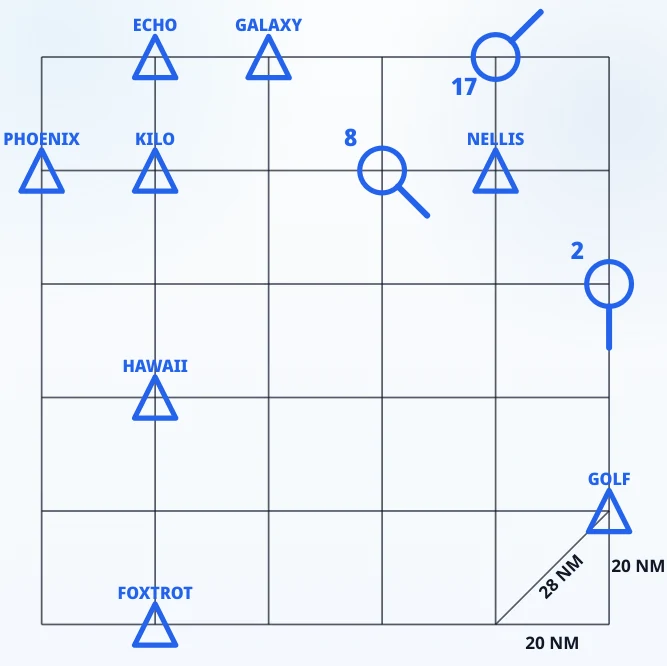
The board is a square grid. Aircraft and waypoints sit on the crossings. A blue circle marked with a number is an aircraft, and the short line on it is its current heading. A blue triangle with a name is a waypoint. Other aircraft and waypoints can share the same grid. The legend in the corner marks one side of a square as 20 NM and the diagonal as 28 NM.
Headings use a compass. 000 is up, north. 090 is right, east. 180 is down. 270 is left. Rotation is the turn from the aircraft’s current heading onto the heading that points at the next waypoint. A positive number turns clockwise. A negative number turns the other way. The value is the shorter turn.
Distance follows the grid. A leg runs straight along a row, a column, or a diagonal. Count the squares: each side is 20 NM, and each diagonal step is 28 NM. When the route goes to a final waypoint via another, add the legs for the total to that final waypoint. On Hard and TEST the question can also ask for the total distance to the via waypoint. That figure is the first leg alone.
The question names the aircraft and the waypoints. It may ask for one value: a distance, a heading, or a rotation. It may also ask for several of those together, and a value can belong to the aircraft’s current position or to the via waypoint. Four options appear under the grid. Click the one that matches. If the timer runs out, the round is wrong.
Difficulty runs from EASY, through Medium and Hard, to TEST. When a round pauses, an arrow shows the route the question was about.
Priorities
Start with the names in the question, then the pointer, then the squares. A heading is measured from north. A rotation is measured from the pointer. On a combined question, match each number to the point it belongs to: the aircraft now, the via waypoint, or the whole route. A total to the final waypoint is both legs. A total to the via waypoint is the first leg.
The in-module walkthrough shows the grid, the aircraft, the waypoints, the intersections, and the compass before the timed rounds begin. Distinguish Left and Right, Cube Folding, and Plan Aircraft are other FEAST I modules in the suite. A broader overview is available in FEAST Modules Explained.
Disclaimer: FEAST Preparation Suite is an independent training tool designed to support candidates preparing for air traffic controller assessments. This product is not affiliated with, endorsed by, or officially connected to EUROCONTROL or the FEAST test. FEAST is a registered trademark of EUROCONTROL. All training modules are original and independently developed. The exercises included in this product are designed to strengthen the core ability areas important for air traffic controller screening. While some modules may resemble the style of tasks candidates can encounter during selection, they are not intended to simulate, reproduce, or replicate any official test.