
Introduction
Plan Aircraft is the landing-order module in the FEAST Preparation Suite. Each round presents a static map of approaches, the special rules for the round, and one multiple-choice question about landing order or which checkpoints an aircraft will overfly. You click A, B, C, or D before the timer runs out.
The task
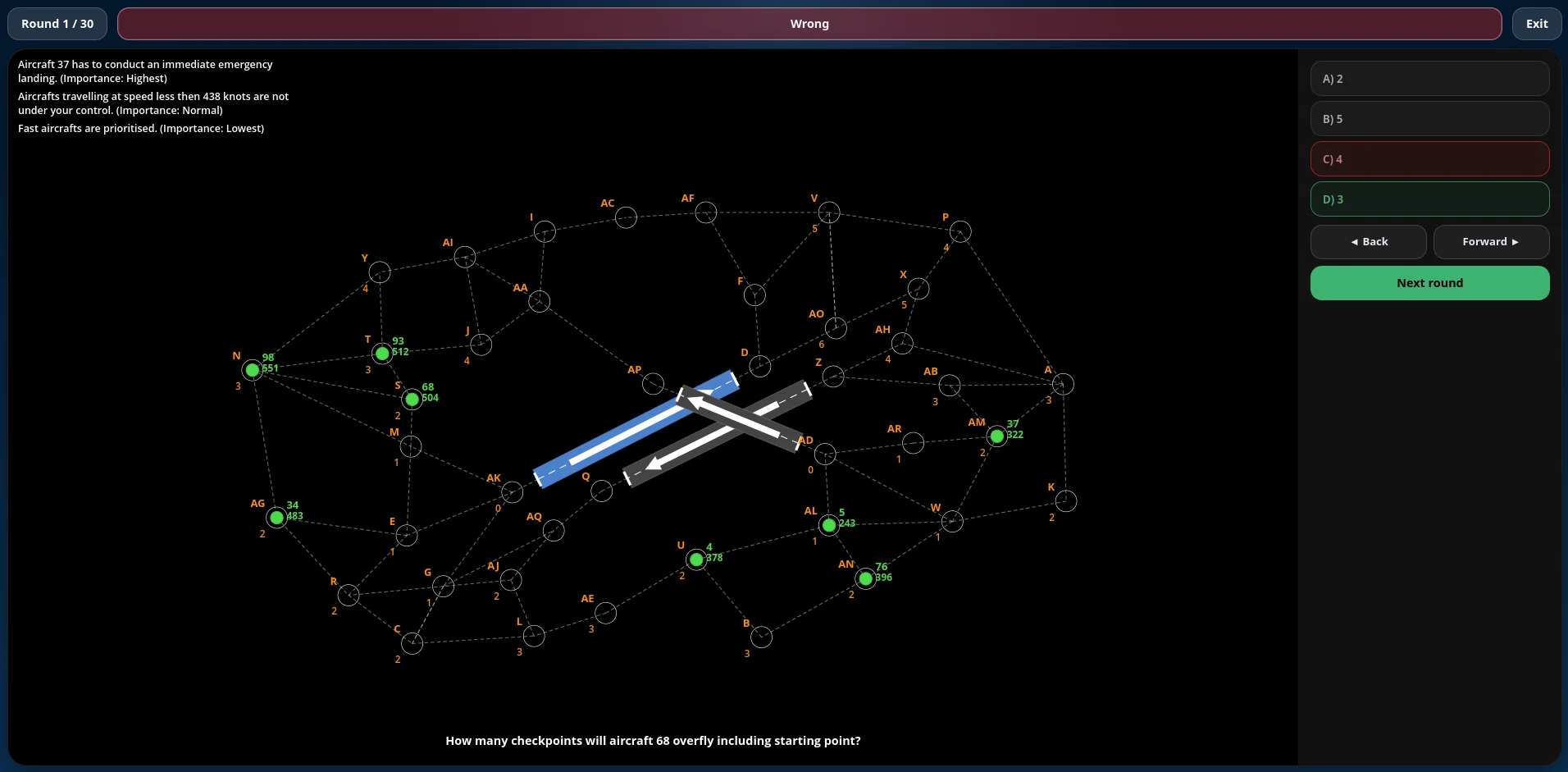
Special rules are shown in the top-left corner of the map, so read them before answering the question. They are not the same in every round. There are three kinds. A speed rule uses the printed speed to decide which aircraft are under your control and which must land without delay. The speed itself stays as printed. Approach priority gives the next checkpoint to the faster aircraft or the slower one, depending on the rule. The third kind is an emergency landing. Importance runs from the emergency, which is highest, to the speed rule, then approach priority. When two rules apply to the same contest and point to different outcomes, the higher one takes precedence. An emergency wins only among aircraft competing for the same next checkpoint.
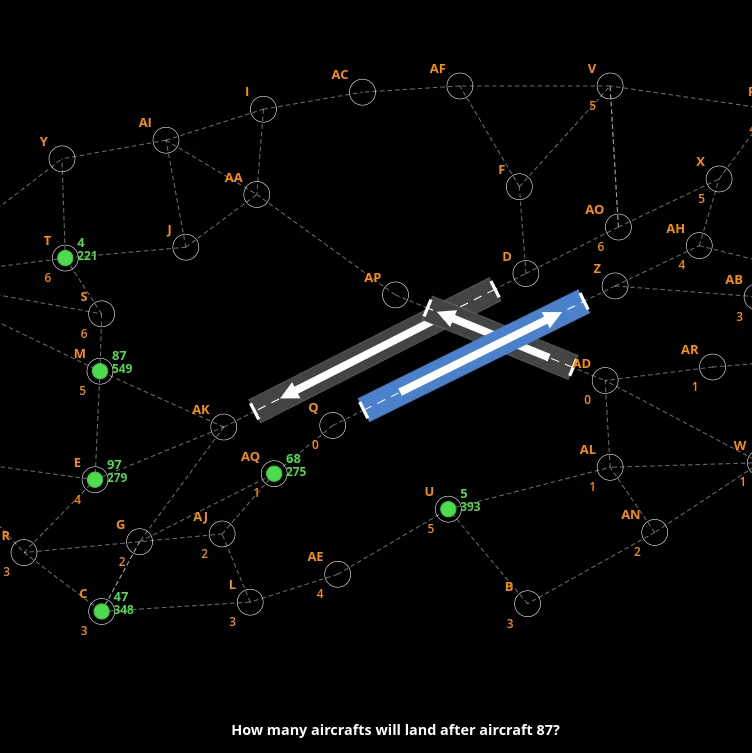
Green circles represent aircraft, with the aircraft ID shown beside each one and its speed in knots shown below. White rings mark checkpoints, orange letters identify them, and the orange numbers show the approach order, with lower numbers being closer to landing and 0 marking the final point on the approach. The blue runway is the one you control, while the white arrow shows the landing direction.
Each question focuses on one of the aircraft you still control and asks you to determine how many checkpoints it will overfly, including its starting point, which checkpoints those are, how many aircraft will land before or after it, or which aircraft will land immediately before or after it. When the question asks which aircraft lands before or after, select the aircraft directly ahead of or behind the target aircraft on the runway you control, rather than listing all aircraft in that order. If no aircraft meets the condition, select None.
Four answer options are shown in the side panel, and you select one to submit your answer. If the timer runs out, the answer is counted as incorrect. Difficulty runs from EASY, through Medium and Hard, to TEST. The same map-reading and rule-application task runs throughout.
Priorities
Read the rules first, then the question, and only then work through the map. An emergency wins only among aircraft competing for the same next checkpoint, so that aircraft takes the checkpoint and the rest of the sequence stays. Pay attention to the orange approach numbers, as they show the order in which aircraft have to go through the waypoints, and remember to include the aircraft’s starting point when counting checkpoints. For landing-order questions, only consider aircraft landing on the runway you control.
The walkthrough covers the question, the aircraft, the runway, the waypoints, the special rules, the answer, and the replay. Detect Conflicts and Estimate Distances and Directions sit with this one in FEAST I. Radar Control is later, under FEAST II. A longer write-up of the FEAST I battery is available in FEAST Modules Explained.
Disclaimer: FEAST Preparation Suite is an independent training tool designed to support candidates preparing for air traffic controller assessments. This product is not affiliated with, endorsed by, or officially connected to EUROCONTROL or the FEAST test. FEAST is a registered trademark of EUROCONTROL. All training modules are original and independently developed. The exercises included in this product are designed to strengthen the core ability areas important for air traffic controller screening. While some modules may resemble the style of tasks candidates can encounter during selection, they are not intended to simulate, reproduce, or replicate any official test.