
Introduction
Scan and Compare Figures is a visual-comparison module in the FEAST Preparation Suite. Each question shows a diamond on the left and figures on the right. You decide whether any of them match the left box.
The task
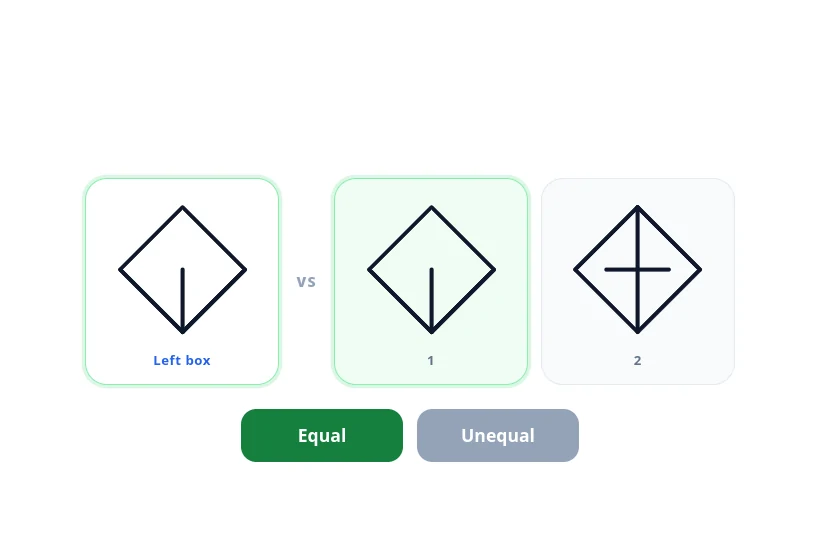
The left box is the reference. The diamonds on the right are numbered. A box on the right can be empty. Compare the inner lines, not only the shared diamond outline. A match is the same pattern in the same places. A figure that is only similar is a different figure.
Press Equal if at least one figure on the right matches the left box. One match is enough, and so is a match in both boxes. Press Unequal only when none of them match. An empty box is not a match. If the timer runs out, the question is wrong. The next question follows on its own.
Difficulty runs from EASY, through Medium and Hard, to TEST. The task stays the same throughout. Compare the left box with every figure on the right, then choose Equal or Unequal.
Priorities
Look at the left box first, then check each numbered box for that same inner pattern. Stop when you find one match. A near-match, or a box that is empty, still leaves the other box to check. Unequal is the answer only after every box on the right has failed that check.
The in-module walkthrough shows a single match, a case where both boxes match, and a case where neither matches, before the timed questions begin. Cube Folding, Distinguish Left and Right, and Detect Conflicts are other FEAST I modules in the suite. A broader overview is available in FEAST Modules Explained.
Disclaimer: FEAST Preparation Suite is an independent training tool designed to support candidates preparing for air traffic controller assessments. This product is not affiliated with, endorsed by, or officially connected to EUROCONTROL or the FEAST test. FEAST is a registered trademark of EUROCONTROL. All training modules are original and independently developed. The exercises included in this product are designed to strengthen the core ability areas important for air traffic controller screening. While some modules may resemble the style of tasks candidates can encounter during selection, they are not intended to simulate, reproduce, or replicate any official test.