

New FEAST Module: Memorize Pictograms Is Now Available
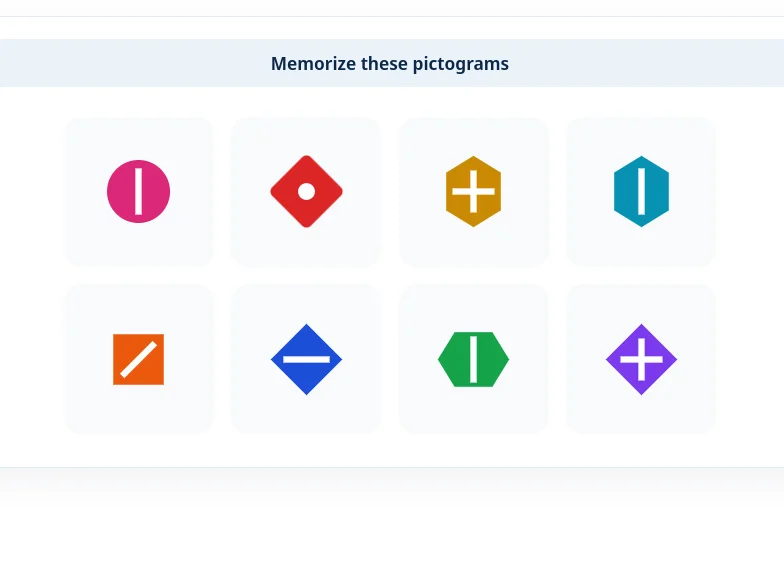
Memorize Pictograms combines visual memory, mental arithmetic, and timed recall in alternating round formats.
Last updated: June 7, 2026
Train with Preparation Software for FEAST
Train FEAST I, FEAST II, and FEAST III skills in the FEAST Preparation Suite with all difficulty levels, TEST mode, statistics, and candidate comparison.
We are pleased to share that Memorize Pictograms is now live in the FEAST Preparation Suite. As the ATC Preparation team, we built this module to train the same working-memory pattern many candidates face during air traffic controller selection: hold visual information in mind while another task interrupts you, then recall it accurately under time pressure.
If you already use our suite for tasks like Memory Competence or Assign Objects to Categories, Memorize Pictograms adds a complementary challenge focused on pictorial recall rather than sequences or rule switching.
Why we added Memorize Pictograms
FEAST preparation is not only about radar tasks and conflict detection. Several modules used in air traffic controller selection test whether you can store visual detail, switch attention to a secondary task, and still retrieve the original information when it matters.
Memorize Pictograms targets exactly that pattern. Candidates see unique symbols (different shapes, inner marks, rotations, and colors), then work through a short mental-arithmetic phase before being asked to recall what they saw. The interruption is deliberate: it mirrors the real assessment pressure of holding information while your attention is pulled elsewhere.
How it works
Each round follows the same three-phase flow:
- Memorize: study the pictograms shown on screen.
- Math: decide whether each displayed equation result is correct or incorrect.
- Recall: answer questions about the pictograms you memorized before the math phase.
Difficulty scales across Easy, Medium, Hard, and Test levels with more pictograms, shorter display times, more math items, and tighter recall windows. On Test level, feedback is hidden so the experience matches exam-style pressure more closely.
Two round formats
Rounds alternate between two presentation styles so you do not rely on a single memorization habit:
Pair rounds
Pictograms appear two at a time during the memorize phase. In recall, you see a new pair where one pictogram was shown earlier and the other is new. Your job is to click the one you already saw.
Color rounds
The full set of pictograms appears together, each in a different color. After the math phase, recall shows a grid of same-color pictograms (for example, all red) and asks you to pick the shape you memorized for that color.
Together, these formats train both recognition memory and shape discrimination when color is no longer a helpful cue during recall.
Where to try it
Memorize Pictograms is available in the FEAST Preparation Suite with progress tracking, statistics, and all difficulty levels from Easy through Test.
For a deeper breakdown of objectives, mechanics, and coaching tips, visit the Memorize Pictograms module page.
How to prepare
From our experience building and testing this module, the candidates who improve fastest treat each round as three separate skills rather than one blur:
- During memorize, focus on distinctive features (outer shape, inner mark, rotation), not just color.
- During math, stay accurate but do not let the arithmetic phase erase the pictograms from working memory.
- During recall, read the prompt carefully: pair rounds ask which pictogram you saw before; color rounds ask which shape matched a given color.
Start on Easy to learn the rhythm, then move up once you can complete full rounds without guessing. Pair this module with other memory-focused tasks in the suite for balanced preparation.
Related Blog Posts

Transavia Pilot Aptitude Test: Compass and CPP Guide
Transavia uses Compass, the EPST aptitude battery, and CPP, the Checklist Professional Profile. Direct-entry first officers and Airline Pilot Program applicants then follow different selection stages.

Ryanair Pilot Aptitude Test: A Guide to Aon and cut-e
Ryanair asks applicants to complete an online Aon aptitude test, still called cut-e, before the simulator. The process depends on whether you apply direct with a Ryanair Group airline or through the Future Flyer Academy.
Free FEAST Training: How to Prepare for FEAST I and FEAST II
Free FEAST training for FEAST I and a first look at FEAST II: which modules are included, how to start, and when the Easy level stops being enough.