

Best FEAST Training Software in 2026: How to Prepare for FEAST I and FEAST II
A useful comparison of FEAST preparation software should look at what each platform offers, which stages it covers, and how much practice you get for the price. The best choice depends on how much time you have before your assessment and which tasks you need to practise most.
Last updated: October 23, 2026
Short answer
Start with EUROCONTROL's free training platform. It introduces the main FEAST I task types, has a straightforward interface, and provides basic performance statistics. It's a useful starting point if you want to get familiar with the test format.
If you want to practise a wider range of tasks, including FEAST II, you can also look at third-party preparation tools. Our FEAST Preparation Suite includes additional FEAST I modules, plus DART, Radar Control, and Multi Pass. You can try a selection of exercises first through our free browser practice.
What you are preparing for
FEAST (First European Air Traffic Controller Selection Test) is a series of assessments developed by EUROCONTROL to help select air traffic controllers. It consists of several stages, although not every organisation uses all of them.
FEAST I includes cognitive tests and an English test. Candidates who pass may progress to FEAST II, which is one or two work samples: the RADAR test and, at some organisations, MULTI-PASS. FEAST III, used by many organisations, is a personality questionnaire with no right or wrong answers. You rate yourself from 1 to 5. The exact process depends on the organisation, so always follow the instructions in your assessment invitation.
On its candidate page, EUROCONTROL gives these session lengths:
- FEAST I: 2.5–4 hours, including cognitive tests and English. The length depends on how many tests the organisation uses.
- FEAST II: 1.5–2 hours for each test. An organisation may use RADAR only, or RADAR and MULTI-PASS.
- Personality questionnaire: no strict time limit. The FEAST III description expects most candidates to finish in around 35–40 minutes. The FAQ also says about 45 minutes.
You don't need previous aviation knowledge. EUROCONTROL says everything required for a test is in the instructions. Each test starts with an introduction that includes example items, and you answer a sample question before the scored section. Later stages, such as interviews, are separate, and knowing the air traffic control job can matter there.
Not every organisation uses the FEAST I and FEAST II labels in its public recruitment information. For example, NAV CANADA describes its process in terms of an online assessment and an in-person assessment day. You can find the details on its official selection page or read our NAV CANADA selection guide.
For a broader overview of the assessment stages and what to expect, see Understanding the FEAST Test.
What to check before you pay
Before buying, check what other people say about the platform. Reviews can give you a better idea of whether the exercises are useful, whether the site works properly, and whether users feel they got their money's worth.
It's also worth checking the price and how long you'll have access. Some platforms offer access for just a week, while others give you several months. The price only really makes sense when you know how long you can use the platform.
Take a look at what the platform offers, too. Getting a score at the end of a test isn't that helpful on its own. It's better if you can track your progress, see which areas you need to work on, and compare your results with those of other candidates doing the same exercises. This gives you a better idea of how you're doing and how your performance compares with others.
Finally, see if you can try the platform for free before paying. Even a few sample exercises can help you decide whether it's right for you. That way, you can judge the platform based on your own experience rather than just what the company claims.
How the options compare
Several other providers offer FEAST preparation tools, but this comparison focuses on the official EUROCONTROL platform, dedicated practice software, and general brain-training apps. If a website claims to offer the actual FEAST questions, keep in mind that EUROCONTROL does not publish them.
| Option | FEAST I practice | FEAST II practice | Progress tracking | Cost |
|---|---|---|---|---|
| EUROCONTROL training platform | Covers the basic principles of FEAST I tasks. The exercises are designed to familiarise candidates with the test format. | The public platform focuses on FEAST I task principles. | Free account required. Includes basic statistics. | Free |
| FEAST Preparation Suite | Timed cognitive modules, with English practice available separately. | DART, Radar Control, and Multi Pass, each with an introductory tutorial and progressively more challenging levels. | Saved results and performance comparisons with other candidates on the paid plan. | Free preview available, with full access through a paid plan. |
| General brain-training apps | Can help practise memory, attention, and mental arithmetic, depending on the app. | General exercises rather than dedicated FEAST II tasks. | Depends on the app. | Depends on the app. |
The FEAST Preparation Suite includes timed cognitive modules, covering tasks such as Detect Conflicts, Divided Attention, Fold Cubes, Scan and Compare Figures, Remember Instrument Readings, and Plan Aircraft. For a detailed explanation of each module and the skills it tests, see FEAST Modules Explained.
The suite also includes the FEAST II modules DART, Radar Control, and Multi Pass. Each module begins with a tutorial that explains the task before you move on to increasingly challenging levels. For a step-by-step preparation schedule, see How to Prepare for FEAST II.
You can try several exercises for free directly in your browser, including Detect Conflicts, Distinguish Left and Right, Estimate Distances and Directions, Fold Cubes, Scan and Compare Figures, and Remember Instrument Readings, plus shorter FEAST II-style exercises covering aircraft navigation and strip classification.
If your organisation uses the personality questionnaire, practice for it is on a separate personality questionnaire page.
Try the free preview, then the full suite
Try a few exercises in the browser before you pay. The price for the full suite is on that page.
What that practice looks like
Radar Control puts you in charge of aircraft moving through a network of corridors. You need to guide each aircraft to its assigned exit while keeping enough distance between aircraft and responding to incoming calls.
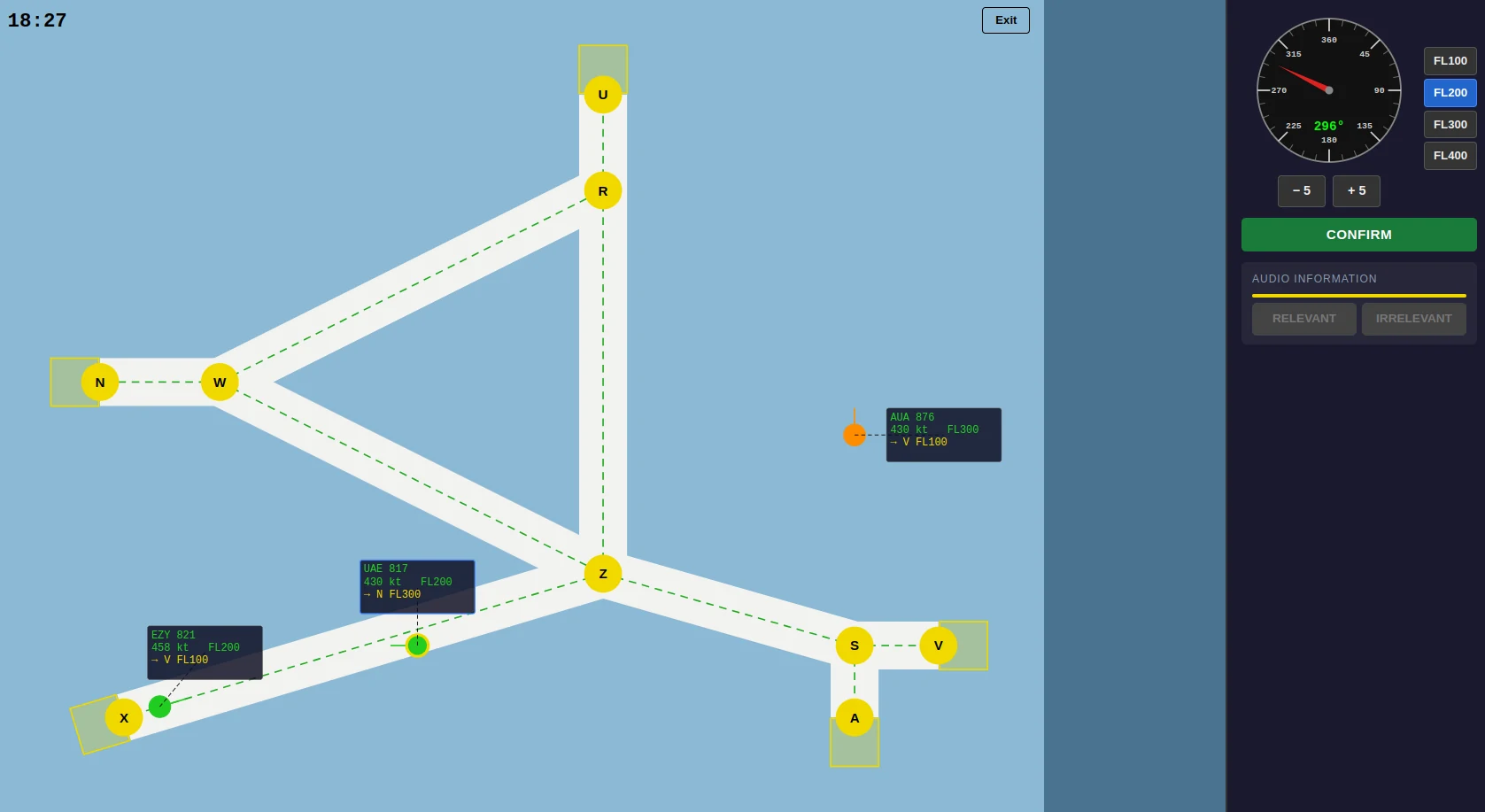
Radar Control in the FEAST Preparation Suite.
DART takes place on a circular radar screen. You guide the green aircraft through numbered waypoints while avoiding other aircraft flying at the same level. When audio is enabled, you also need to remember and enter spoken numbers while managing the traffic.
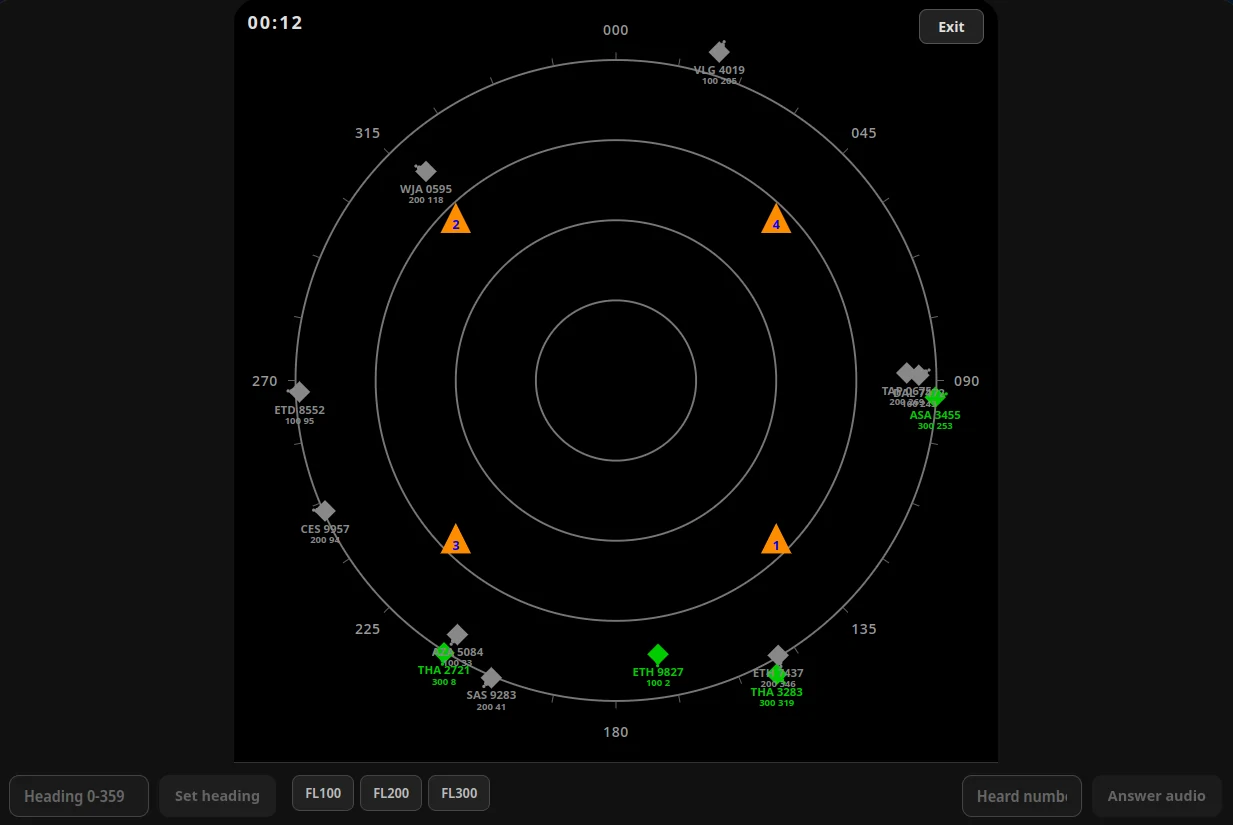
DART in the FEAST Preparation Suite, combining radar navigation with an audio memory task.
Your results are saved after each round, so you can track your scores across sessions and see how you're improving in different modules.
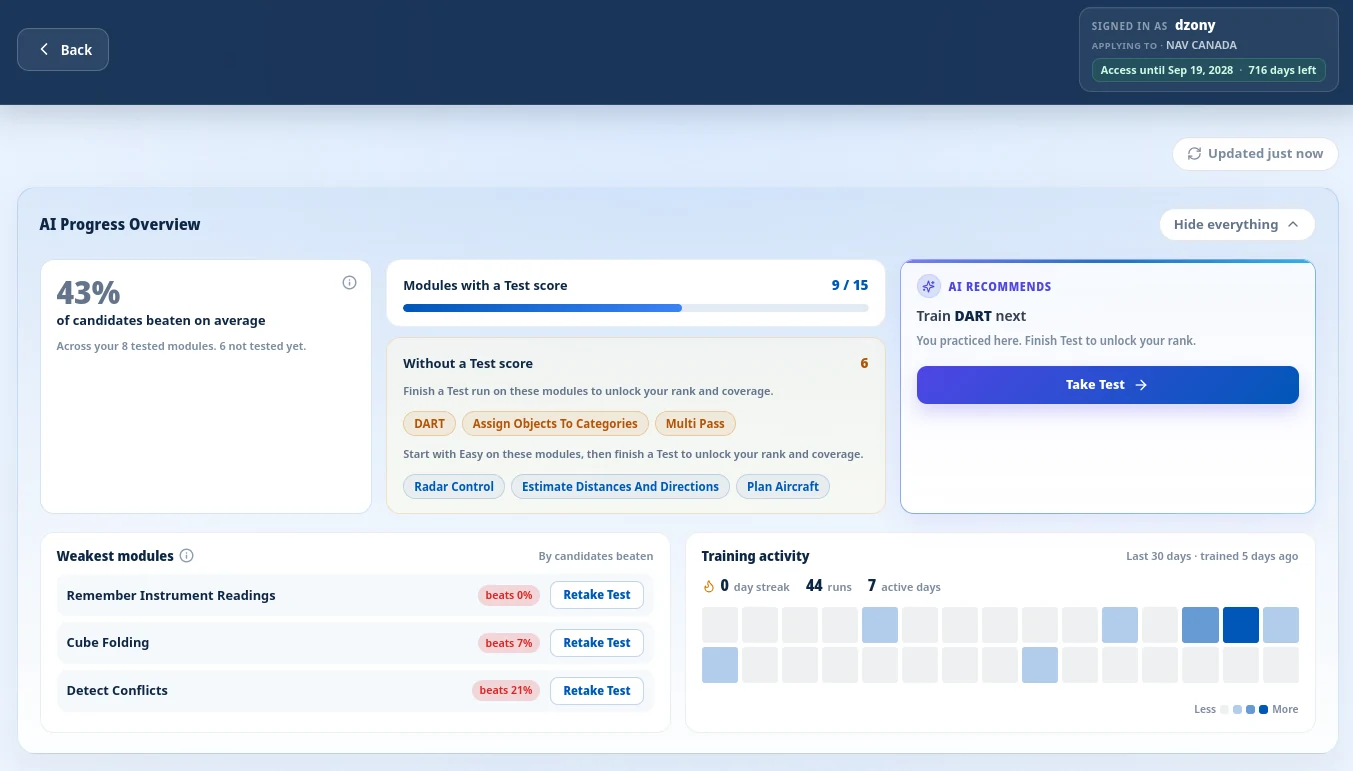
The progress overview lets you review your saved scores and follow your performance over time.
How to spend the weeks you have
The schedule below is a practical recommendation, not a requirement from EUROCONTROL. If you have six to eight weeks to prepare, start by working on the FEAST I modules you find most difficult, after trying the EUROCONTROL training platform. Aim for 30–60 minutes of practice on most days and focus on completing each session. During the final two weeks, spend more time on DART, Radar Control, and Multi Pass, while continuing to practise FEAST I once a week.
If you only have a few days, focus on getting familiar with the tasks. Go through each FEAST II tutorial, practise DART, Radar Control, and Multi Pass under timed conditions, and revisit the FEAST I modules you struggled with most.
If your invitation includes an English test, set aside separate time to prepare for it. If you also need to complete a personality questionnaire, do it in one sitting and answer honestly. EUROCONTROL advises candidates to respond naturally rather than overthink each question.
For advice on the day of your assessment, see How to Pass the FEAST Test. If you don't pass, the rules for retaking the test depend on the organisation. EUROCONTROL recommends contacting the organisation that assessed you. Our guide to failing FEAST explains what to ask next.
Common questions
What is the best FEAST training software in 2026?
Start with EUROCONTROL's free platform to learn the FEAST I format. For wider practice, including FEAST II, use a dedicated suite. Ours is the FEAST Preparation Suite, which also has a free preview.
Will practice software show me the real FEAST questions?
No. EUROCONTROL does not publish the live FEAST questions. Its training platform helps you become familiar with the principles behind FEAST I tasks, while third-party platforms offer their own practice exercises designed around similar skills and challenges.
Is free FEAST training enough?
It can get you used to the FEAST I task types. Wider practice, FEAST II, and saved scores are part of a paid plan.
How long should I prepare for FEAST?
Six to eight weeks is a practical recommendation if you have the time, not an official EUROCONTROL requirement. Aim for 30–60 minutes of practice on most days, focusing on the tasks you find most challenging. If your assessment is coming up soon, prioritise timed practice and spend more time on FEAST II tasks.
Do I need aviation knowledge?
No previous aviation knowledge is required for the FEAST tests. EUROCONTROL explains that the instructions provide the information needed to complete each task. Learning about the aviation industry may be useful for later stages of the selection process, but it is not a prerequisite for the tests themselves.
Related Blog Posts
COMPASS Pilot Aptitude Test: A Practical Guide to the EPST Battery
COMPASS is EPST's pilot aptitude battery, used by Emirates, Etihad, Transavia and cadet academies. Your invitation sets the modules and whether you sit online or at a centre.
Read More
ADAPT Pilot Test Explained: What Symbiotics Screening Covers
Symbiotics ADAPT is the pilot aptitude screen CAE uses on many cadet programmes. The invitation decides which tasks you sit, so two ADAPT sittings can differ.
Read More
Aon Pilot Test Explained: What cut-e Screening Covers
The Aon pilot test is a set of short timed scales, still often called cut-e. Airlines choose which skills to include, so two sittings can differ.
Read More